What is an EPP Code?
An EPP code is an essential security feature for domain transfers, ensuring that only the rightful domain owner can authorize the transfer. By understanding how to obtain and use an EPP code, you can securely manage your domain transfers.
Before you start, make sure that:
- The domain is registered with SiteGround and appears in your Client Area under Services > Domains.
- The domain is unlocked. See how to lock or unlock your domain name.
- You can access the email address listed as the domain’s administrative contact, in case you need to confirm the transfer.
Why is an EPP Code Important?
The EPP code is crucial for:
- Security: Prevents unauthorized domain transfers by ensuring that only the domain owner can request the transfer.
- Domain Transfers: Required for transferring domain names such as .com, .net, .org, .biz, .info, and .us between registrars.
How to Obtain an EPP Code
If your domain name is registered with SiteGround, you can find the EPP code by following these steps.
- Go to your Client Area > Services.
- Click on Manage under Domains > Settings.
- From the kebab menu, choose Get EPP Code.
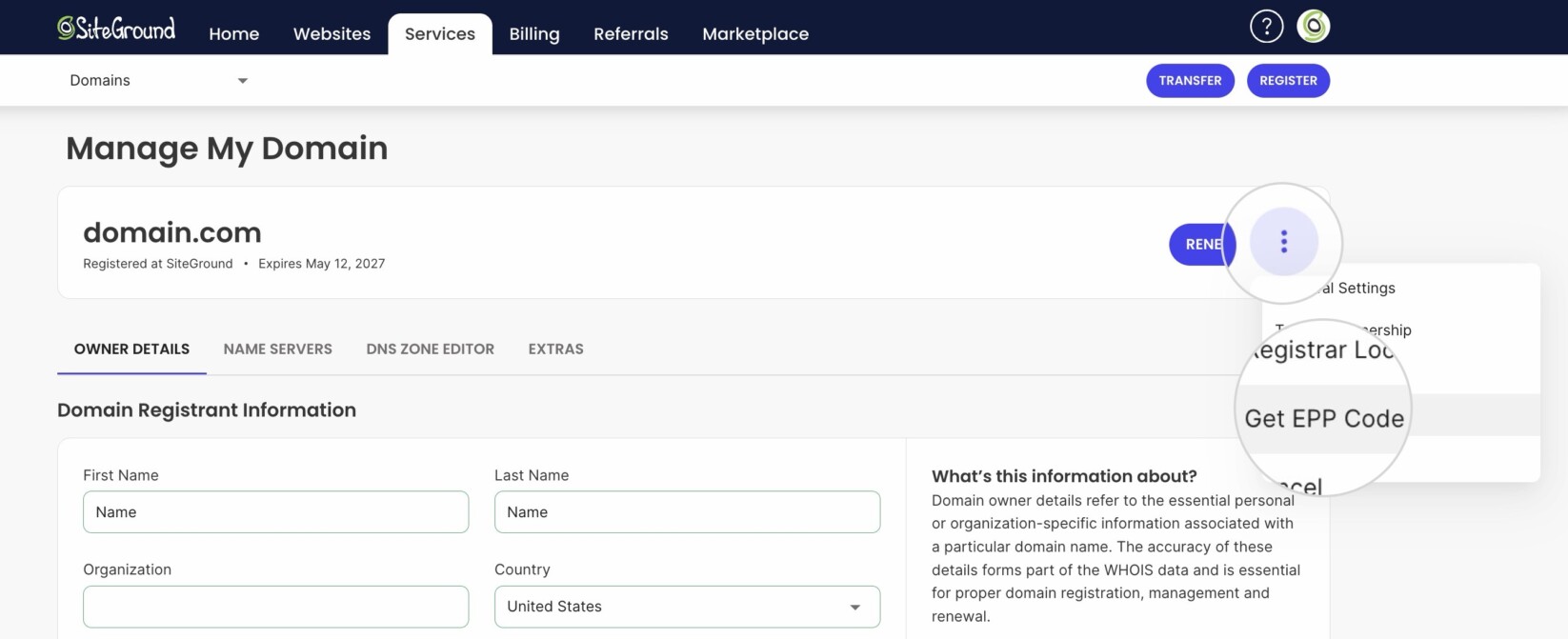
And that’s it.
To move a .co.uk or .org.uk domain to SiteGround, see how to transfer a .co.uk or .org.uk domain. For the full list of extensions you can transfer to SiteGround, see the domain transfer tutorial.
FAQs
- Where do I get the EPP code if my domain isn’t registered with SiteGround?
From your current registrar. SiteGround can only generate EPP codes for domains it registers. - Is an EPP code the same as an auth code?
Yes. EPP code, EPP key, auth code, and authorization code all refer to the same thing. - Why can’t I transfer my domain to or from SiteGround?
The most common reasons are a locked domain, a missing or invalid EPP code, or an active waiting period. See why you can’t transfer your domain to or from SiteGround.